TradFi Integration
- The Bybit-native Spot, Futures, and Options products covered in this guide support trading via the V5 API.
- TradFi CFD products use MetaTrader 5 (MT5) and are not supported by the V5 API.
This guide covers trading products linked to traditional assets, including stock and ETF perpetuals, commodity and forex perpetuals, tokenized stocks, tokenized gold, and options. It maps their Web UI entries under TradFi and Trade to the V5 APIs used to query specifications and trade supported products.
Web UI Entries and API Support
TradFi (Futures, Options & CFD)
Open TradFi in the Web navigation menu to access the following derivatives products:
| Web UI entry | Products | API integration |
|---|---|---|
| TradFi → Futures | USDT-settled perpetual contracts, including stocks, ETFs, commodities, and forex | Bybit-native; V5 category=linear |
| TradFi → Options | USDT-settled options, including stock underlyings such as SPCX and NVDA | Bybit-native; V5 category=option |
| TradFi → CFD | MT5 CFDs, with groups such as metals, stocks, indices, forex, and commodities | MT5; not available through the V5 API |
- Futures
- Options
- CFD
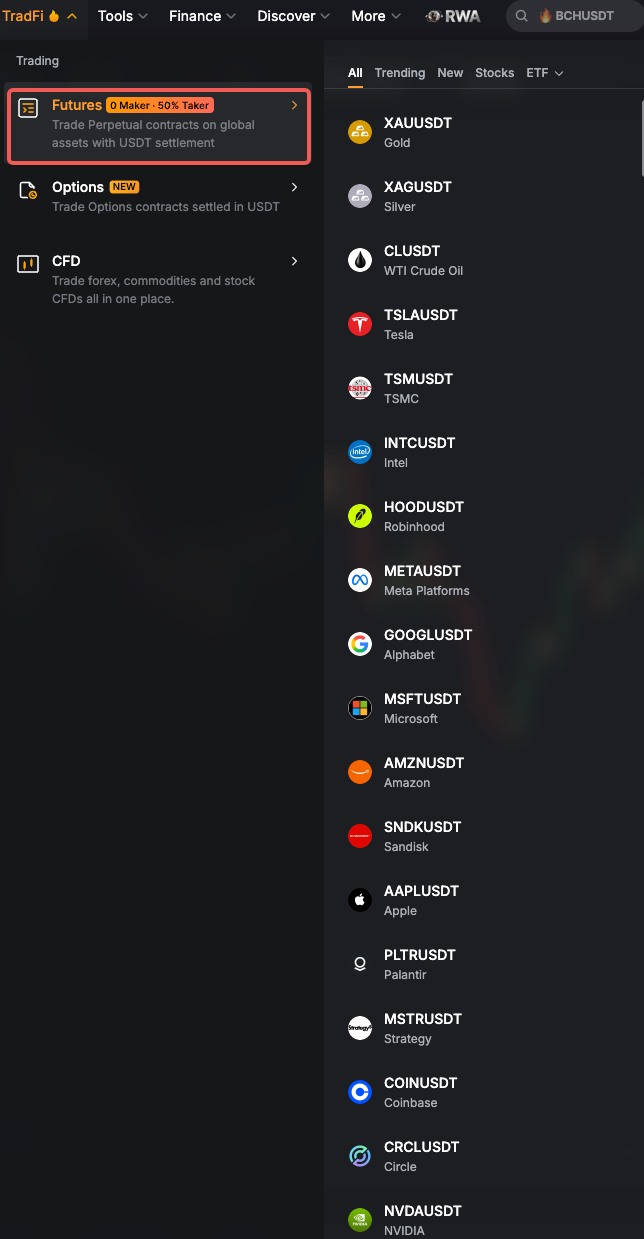
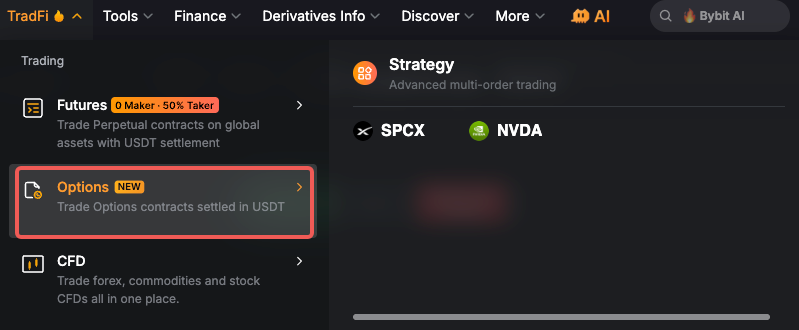
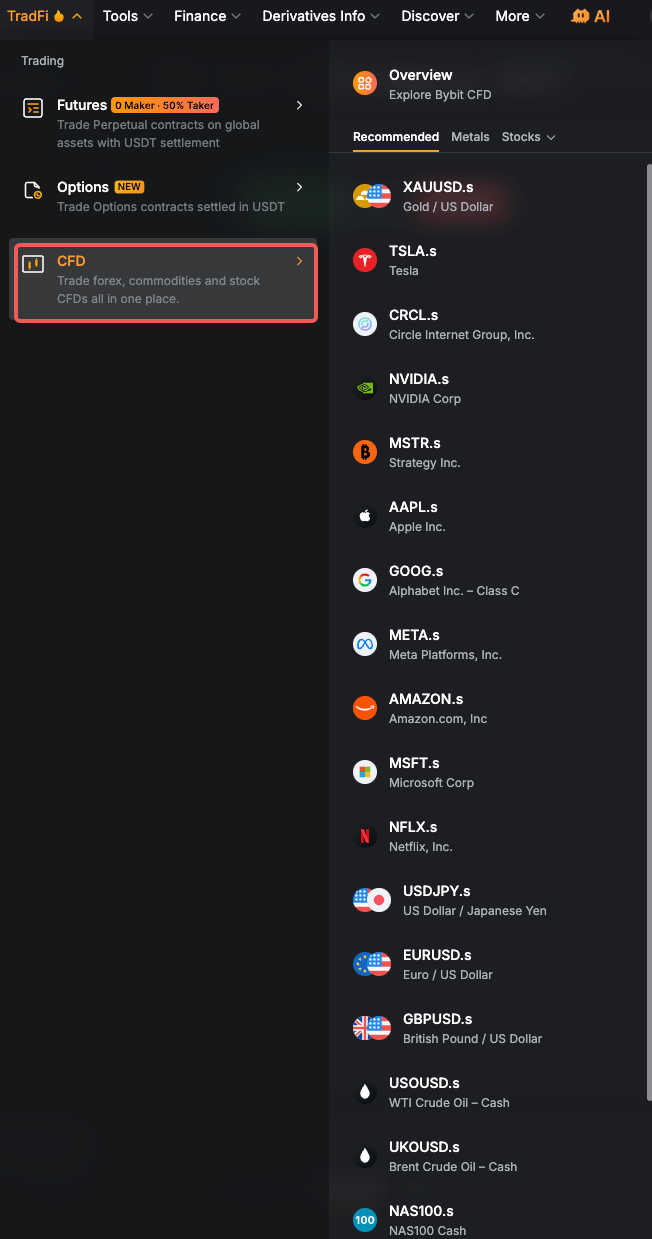
TradFi perpetuals use V5 category=linear, and options use category=option. Use the API parameters described below to discover the corresponding instruments; menu labels are not necessarily API enum values. All, Trending, and New are Web UI filters without dedicated symbolType values.
Trade (Spot, Futures & Options)
All products listed in this section are Bybit-native and support trading through the existing V5 Trade API. Use category=spot for spot pairs, category=linear for the perpetual contracts listed below, and category=option for options.
- Trade → Spot → xStocks: Tokenized stocks, such as
TSLAX,AAPLX, andGOOGLX. - Trade → Spot → RWA: Includes tokenized gold (
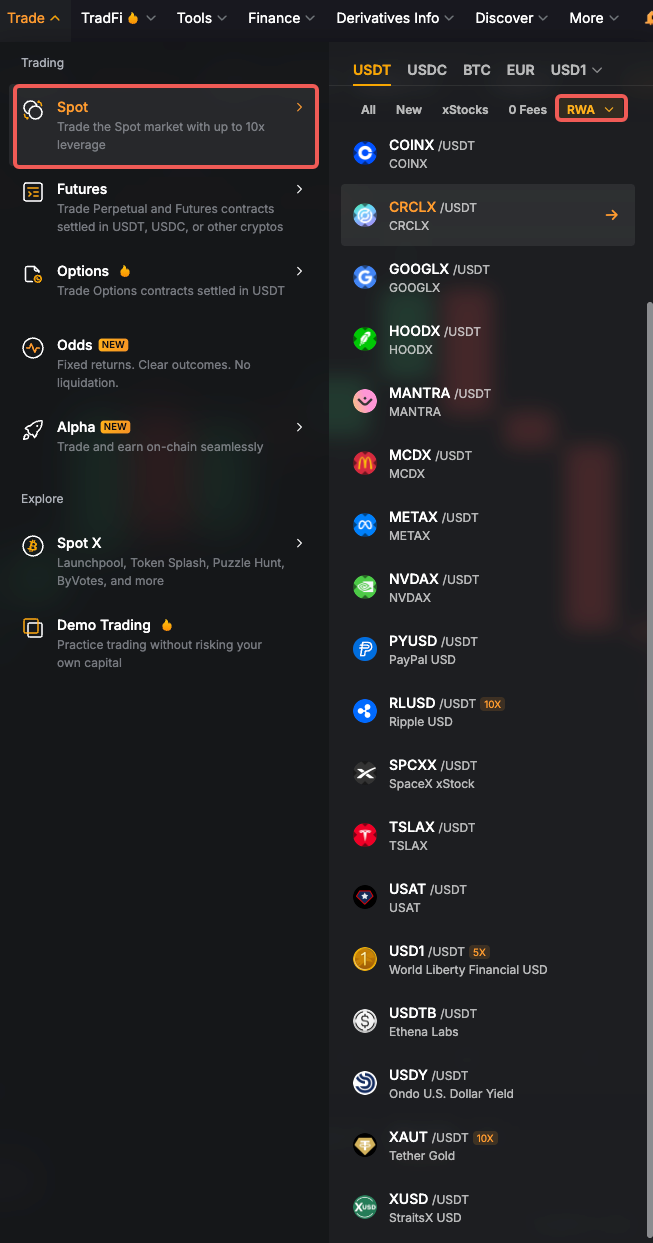
XAUT/USDT), alongside xStocks and other RWA-related assets. - Trade → Futures → USDT → RWA: Includes USDT-settled perpetuals on tokenized gold, such as
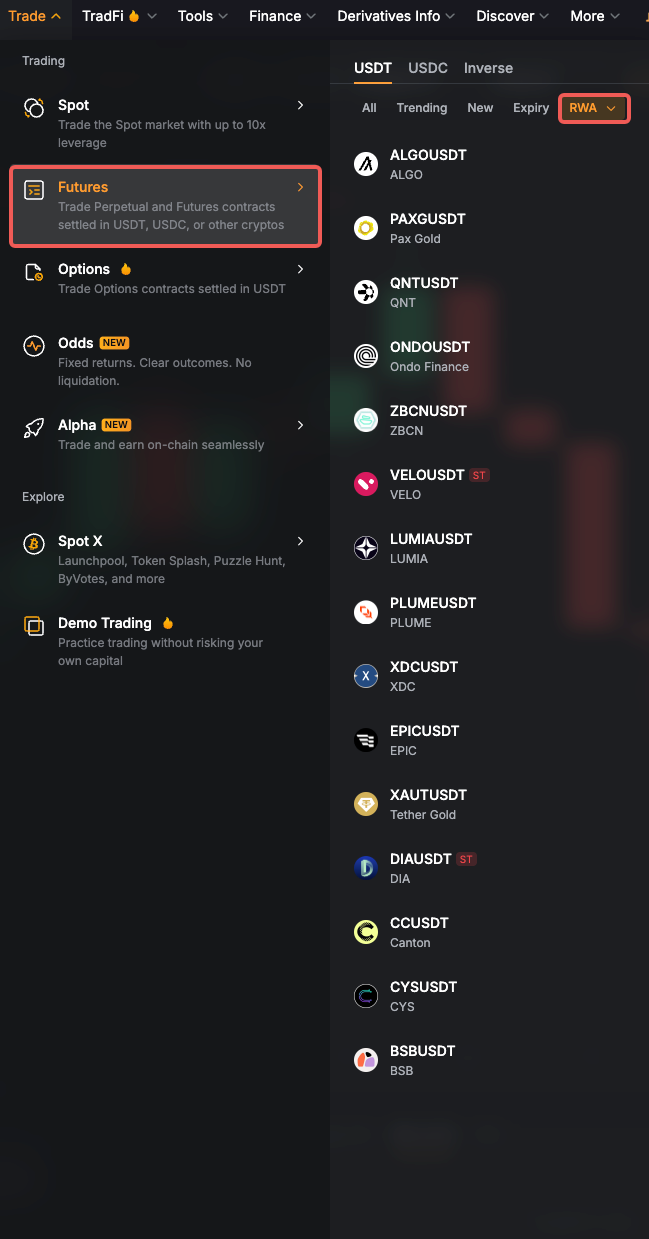
XAUTUSDTandPAXGUSDT. These use V5category=linear. - Trade → Options: Includes USDT-settled options on tokenized gold (
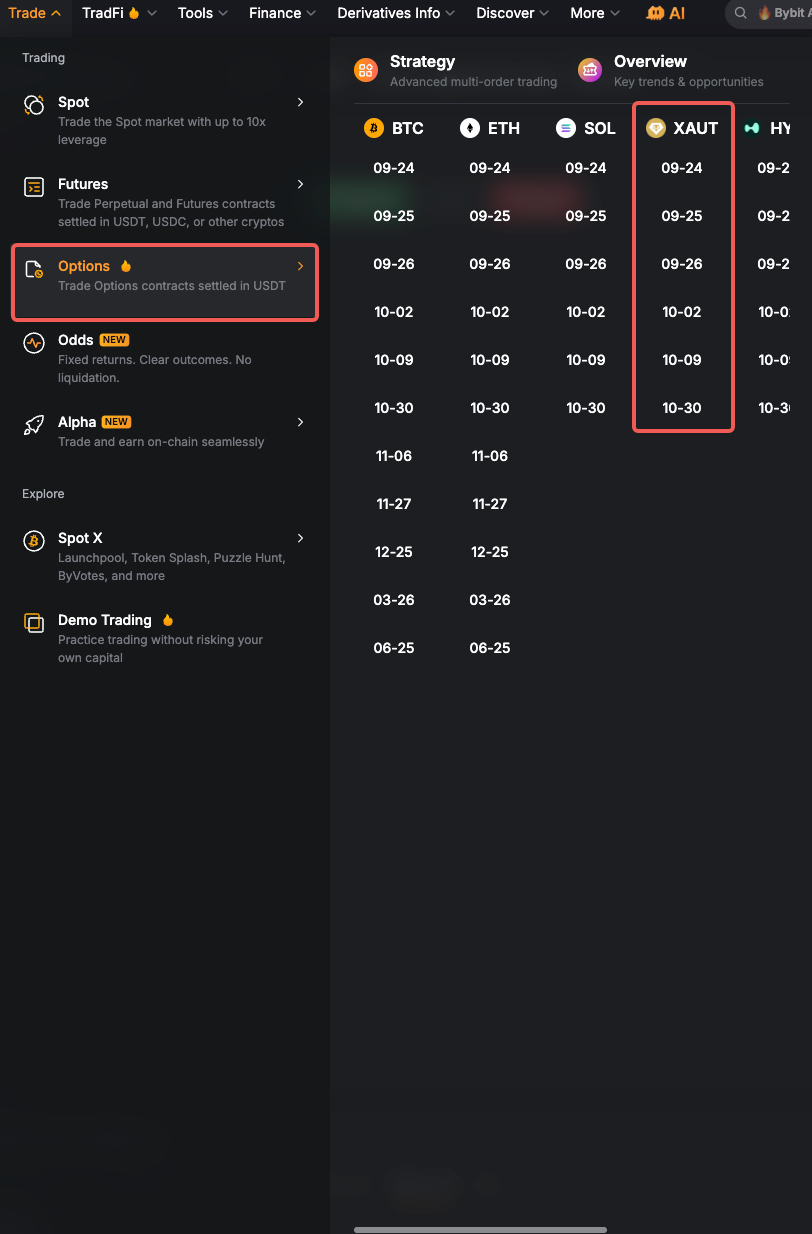
XAUT). These use V5category=option; query their specifications withbaseCoin=XAUT.
- Spot (xStocks)
- Spot (XAUT)
- Futures (XAUT / PAXG)
- Options (XAUT)
After signing in, select xStocks under Trade → Spot to view tokenized-stock pairs, including AAPLX/USDT, NVDAX/USDT, and SPCXX/USDT:
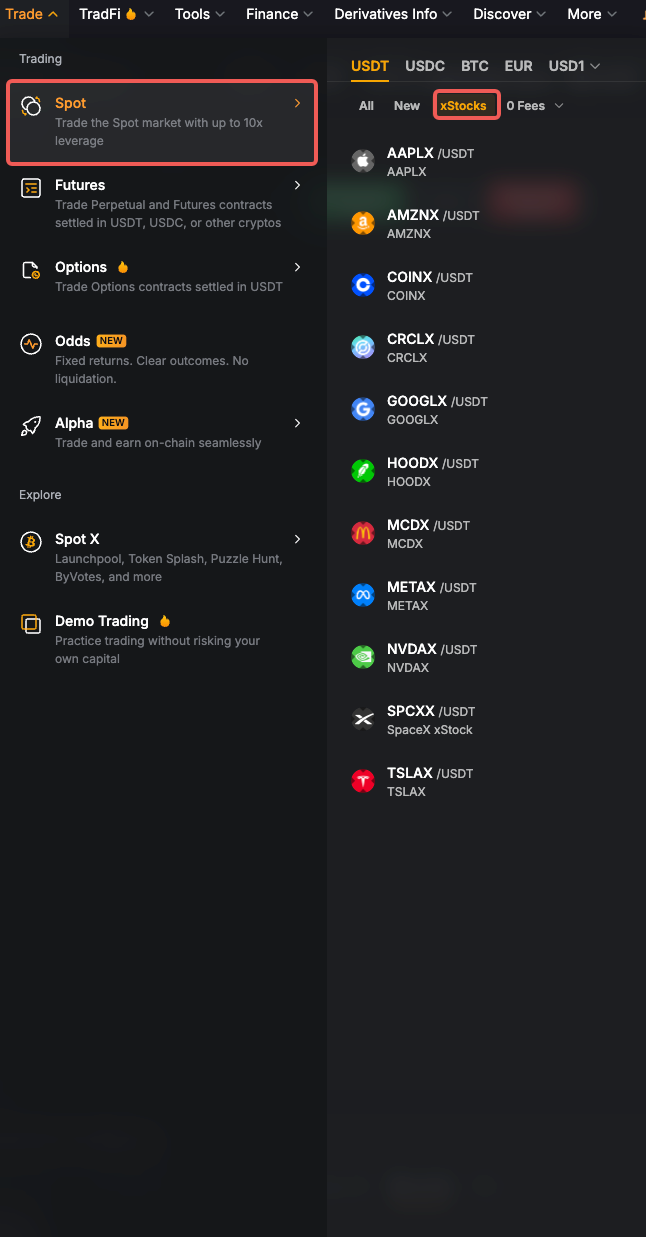
Select RWA under Trade → Spot to find XAUT/USDT (Tether Gold). This broader list also includes xStocks and other assets:
Under Trade → Futures, select USDT → RWA to find XAUTUSDT (Tether Gold) and PAXGUSDT (Pax Gold) perpetuals:
The Trade → Options menu includes XAUT alongside other option underlyings, such as BTC, ETH, and SOL:
xStocks use V5 category=spot and symbolType=xstocks. Query XAUT spot with category=spot and symbol=XAUTUSDT.
The Spot and Futures RWA menus are theme filters, with no corresponding symbolType=RWA value. These lists also contain other RWA-related crypto assets.
Discover TradFi Instruments via API
TradFi Futures: Filter by symbolType
Use Get Instruments Info with category=linear and a symbolType value to retrieve perpetual contract specifications.
/v5/market/instruments-info| Futures group | category | symbolType | Example symbols |
|---|---|---|---|
| Stocks | linear | stock | TSLAUSDT, NVDAUSDT |
| ETF | linear | ETF | QQQUSDT, SPYUSDT |
| Commodities | linear | commodity | XAUUSDT, XAGUSDT, CLUSDT, BZUSDT |
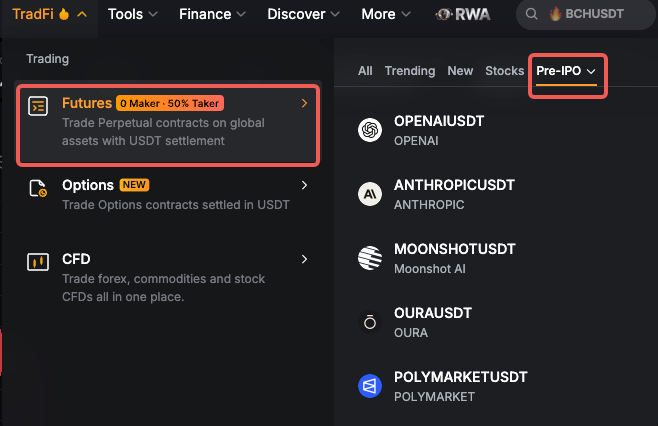
| Pre-IPO | linear | stock (also pass status=PreLaunch) | OPENAIUSDT, ANTHROPICUSDT, MOONSHOTUSDT |
| FX | linear | forex | EURUSDUSDT, GBPUSDUSDT, USDJPYUSDT |
Pass one symbolType per request, using the enum's exact spelling (ETF is uppercase). These products return the standard linear contract fields, including contractType, leverageFilter, priceFilter, lotSizeFilter, and fundingInterval. Use fullName, marketRegion, and underlyingTicker, where available, to identify the underlying asset.
Example requests:
GET /v5/market/instruments-info?category=linear&symbolType=stock&limit=1000
GET /v5/market/instruments-info?category=linear&symbolType=ETF&limit=1000
GET /v5/market/instruments-info?category=linear&symbolType=commodity&limit=1000
GET /v5/market/instruments-info?category=linear&symbolType=stock&status=PreLaunch&limit=1000
GET /v5/market/instruments-info?category=linear&symbolType=forex&limit=1000
If nextPageCursor is non-empty, pass it as cursor in the next request to retrieve the remaining instruments.
To query pre-market stock contracts shown under Pre-IPO, use category=linear, symbolType=stock, and status=PreLaunch. Default list queries omit PreLaunch contracts.
Check isPreListing and preListingInfo.curAuctionPhase for the trading state. A contract with status=PreLaunch can already be in ContinuousTrading.
Options: Discover Base Coins, Then Query Contracts
For stock options under TradFi → Options, first use Get Option Base Coins to discover underlyings. Its underlyingType parameter classifies the underlying asset; 2 selects stocks.
/v5/market/option-base-coinsGET /v5/market/option-base-coins?underlyingType=2
Check hasSymbol=1 for base coins with tradable option contracts, such as SPCX and NVDA. Then call Get Instruments Info with category=option and the returned baseCoin:
GET /v5/market/instruments-info?category=option&baseCoin=SPCX&limit=1000
GET /v5/market/instruments-info?category=option&baseCoin=NVDA&limit=1000
For tokenized-gold options under Trade → Options, use baseCoin=XAUT with the same category=option:
GET /v5/market/instruments-info?category=option&baseCoin=XAUT&limit=1000
Use the returned symbol to identify each expiry, strike, and call/put contract. Option specifications include optionsType, deliveryTime, quoteCoin, settleCoin, priceFilter, and lotSizeFilter. Follow nextPageCursor when present.
The symbolType filter does not apply to category=option. underlyingType belongs to the Get Option Base Coins endpoint; use baseCoin to filter contracts in Get Instruments Info.
xStocks: Related Spot Instruments
For tokenized-stock pairs such as NVDAXUSDT and AAPLXUSDT, use category=spot and symbolType=xstocks in API queries:
GET /v5/market/instruments-info?category=spot&symbolType=xstocks
Use the returned symbol and spot trading rules; xStocks and stock perpetuals have separate instrument specifications. See Get Instruments Info for details.
Tokenized Gold: XAUT Spot
For XAUT/USDT under Trade → Spot → RWA, query its spot specifications by symbol:
GET /v5/market/instruments-info?category=spot&symbol=XAUTUSDT
XAUT spot returns an empty symbolType and is not included in the symbolType=xstocks filter. Use the returned spot trading rules. The same XAUTUSDT symbol also identifies a perpetual contract under category=linear, so always specify the appropriate category.
Tokenized Gold: Perpetual and Expiry Contracts
For the USDT perpetuals under Trade → Futures → USDT → RWA, use category=linear and the full symbol:
GET /v5/market/instruments-info?category=linear&symbol=XAUTUSDT
GET /v5/market/instruments-info?category=linear&symbol=PAXGUSDT
These contracts return contractType=LinearPerpetual and an empty symbolType. They are not included in symbolType=commodity queries. XAUUSDT under TradFi → Futures is a separate commodity perpetual.
To discover other contracts on the same tokenized-gold underlyings, query by baseCoin:
GET /v5/market/instruments-info?category=linear&baseCoin=XAUT&limit=1000
GET /v5/market/instruments-info?category=linear&baseCoin=PAXG&limit=1000
The results include USDC-settled perpetuals (XAUTPERP, PAXGPERP) and XAUT expiry contracts. Check contractType (LinearPerpetual or LinearFutures), quoteCoin, settleCoin, and deliveryTime to identify each contract. Use the returned symbol, and follow nextPageCursor when present.
CFD: MT5 Products
The TradFi → CFD groups, including Stocks, Indices, Forex, Metals, and Commodities, belong to MT5. They are not V5 symbolType values, and their CFD instruments cannot be queried or traded through the V5 endpoints in this guide. For example, the CFD symbol XAUUSD.s shown in the screenshot and the V5 perpetual symbol XAUUSDT identify different products.
Legal Review
Before trading traditional asset perpetuals, please review the applicable terms and conditions:
Sign Agreement by Main Account
To trade commodity contracts (metals and crude oil) or stock perpetuals, users must first sign the trading agreement. Stock perpetuals share the same agreement as metals. This can be done in two ways:
Option 1: Via Web UI
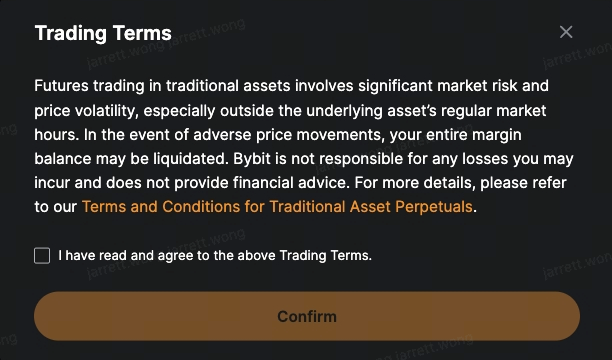
When attempting to trade for the first time, a Trading Terms pop-up will appear. Check the checkbox and click Confirm to accept.
Only the master account can sign the agreement via Web UI. Please ensure you are logged in with the master account.
Option 2: Via API
Use the Sign Agreement endpoint to sign programmatically.
- Only the master account can sign the agreement. Subaccounts are not supported for this action.
- Once the master account has signed, all subaccounts will be eligible to trade.
- The API key must have at least one of the following permissions: Account Transfer, Subaccount Transfer, or Withdrawal.
HTTP Request
POST/v5/user/agreementRequest Parameters
| Parameter | Required | Type | Comments |
|---|---|---|---|
| category | false | integer | 2: Metals commodity contracts (XAU & XAG). Stock perps share this agreement3: Crude oil commodity contractEither category or categoryV2 is required. This field remains supported, but new enum values will no longer be added here — use categoryV2 instead. |
| categoryV2 | false | integer | 1: Metals commodity contracts (XAU & XAG). Stock perps share this agreement2: Crude oil commodity contractEither category or categoryV2 is required. Recommend using this field; new enum values will be added here going forward. |
| agree | true | boolean | true |
Response Parameters
None
Request Example
The following examples sign the metals agreement (categoryV2=1), which is also used for stock perpetuals.
- HTTP
- Python
POST /v5/user/agreement HTTP/1.1
Host: api-testnet.bybit.com
X-BAPI-SIGN: XXXXXX
X-BAPI-API-KEY: XXXXXX
X-BAPI-TIMESTAMP: 1772695036541
X-BAPI-RECV-WINDOW: 5000
Content-Type: application/json

{
    "agree": true,
    "categoryV2": 1
}
from pybit.unified_trading import HTTP
session = HTTP(
    testnet=True,
    api_key="xxxxxxxxxxxxxxxxxx",
    api_secret="xxxxxxxxxxxxxxxxxxxxxxxxxxxxxxxxxxxx",
)
print(session.sign_agreement(
    categoryV2=1,
    agree=True
))
Response Example
{
    "retCode": 0,
    "retMsg": "success",
    "result": {},
    "retExtInfo": {},
    "time": 1772695037330
}
Trade via Existing API
The spot, perpetual, expiry, and option products described above use the standard V5 Trade endpoints. Complete the applicable trading agreements before placing orders; the agreement flow above covers the specified perpetual products. Check each endpoint's supported categories and product-specific parameters:
- Place Order
- Amend Order
- Cancel Order
- Get Open & Closed Orders
- Cancel All Orders
- Get Order History (2 years)
- Get Trade History (2 years)
- Batch Place Order
- Batch Amend Order
- Batch Cancel Order
- Pre Check Order
Pass the appropriate category and a symbol returned by Get Instruments Info:
- Futures:
category=linear, with the full perpetual or expiry contract symbol returned by Get Instruments Info, such asTSLAUSDT,QQQUSDT,XAUUSDT,XAUTUSDT,PAXGUSDT, orXAUTPERP. - Options:
category=option, with the full option contract symbol, including expiry, strike, and call/put. Do not submit only the base coinNVDA,SPCX, orXAUTas the order'ssymbol. - Spot:
category=spot, with the tokenized-stock pair, such asNVDAXUSDTorAAPLXUSDT, or the tokenized-gold pairXAUTUSDT.
Index Price Calculation Rule
TradFi perpetual index prices are calculated from weighted index components. The sources and weights depend on the instrument and market session; components can include price feeds, exchange indices, and futures prices.
- Market open: the index is updated every second using a weighted average of its components.
- Market closed: components that stop updating, such as certain equity or commodity feeds from Pyth, may be temporarily excluded to reduce the effect of stale prices.
- Session transitions: a smoothing mechanism helps maintain index price continuity.
For the methodology and market-session rules, see Introduction to TradFi Perpetual Contracts. For general calculation formulas and price protection mechanisms, see Index Price Calculation. Component and weight changes are published in Index Price Announcements.
To query the current components and weights, use Get Index Price Components:
GET/v5/market/index-price-componentsGET /v5/market/index-price-components?indexName=CLUSDT
The response includes each component's source (exchange), reference symbol (spotPair), equivalent price, multiplier, and weight. The field name spotPair can also identify a futures reference or price feed.
Index Price Rollover Mechanism
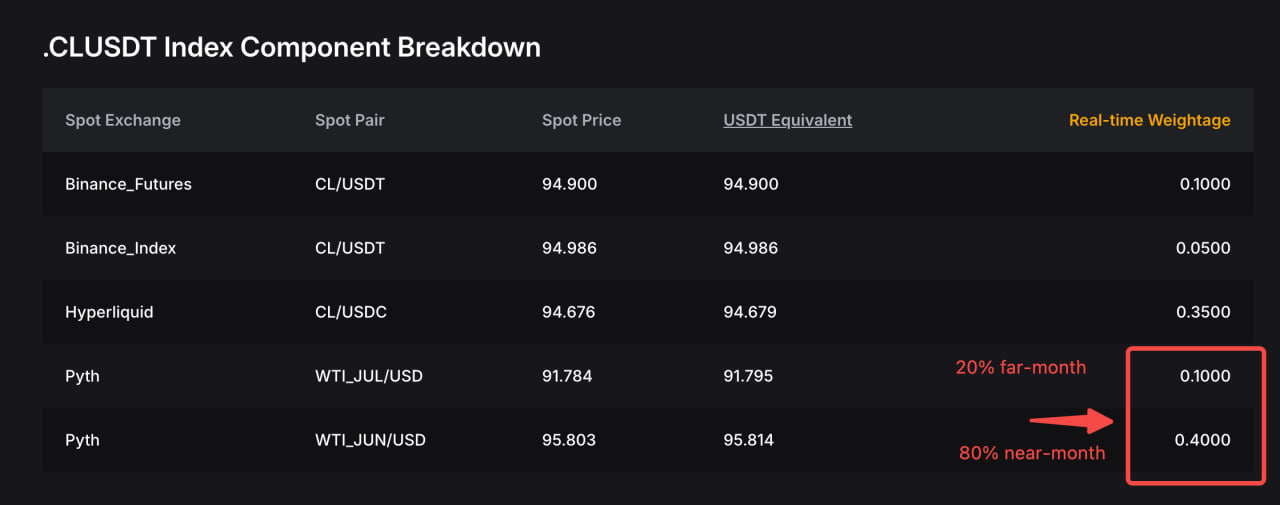
For commodity perpetuals whose index references dated futures contracts, such as CLUSDT, the reference must roll to a later-dated contract as the earlier contract approaches expiry. The index reference changes; the Bybit perpetual contract itself does not expire as part of this rollover.
A gradual rollover shifts weight from the front-month contract to the next-month contract over several days. The following five-day allocation is an illustrative example; the actual dates and weights depend on the applicable rollover schedule:
| Day | Front-Month Weight | Next-Month Weight |
|---|---|---|
| Day 1 | 80% | 20% |
| Day 2 | 60% | 40% |
| Day 3 | 40% | 60% |
| Day 4 | 20% | 80% |
| Day 5 | 0% | 100% (Rollover Completed) |
The screenshot below illustrates CLUSDT index components during a rollover. It is a historical example; query Get Index Price Components for the current reference contracts and weights.
For Pyth components, use the returned reference symbol to locate the feed in Pyth Data Explorer. Refer to the applicable Index Price Announcements for index changes and schedules. Market-closure handling follows the index rules above.
Stock Split & Reverse Split FAQ
For full details, refer to the Help Center: Stock Splits and Reverse Stock Splits for TradFi Perpetual Contracts.
Q1: What will be the status of the contract in the instrumentInfo while it is undergoing the adjustment?
The contract status remains "Trading" in Get Instruments Info during the adjustment window. Trading is nevertheless suspended during the adjustment; use the announced suspension and resumption times, rather than this field alone, to determine availability.
Q2: What happens to the price feed during the adjustment window?
- Bybit will stop sending prices during the adjustment window.
- The last price is not continued — there are no market data updates during this window.
Q3: Will Bybit provide pre-adjustment historical prices after the adjustment window is completed, or does it remove them?
Historical K-line prices will be adjusted accordingly to reflect the split ratio. Personal trading history (your own order and execution records) will not be changed.