Your First Knowledge Base
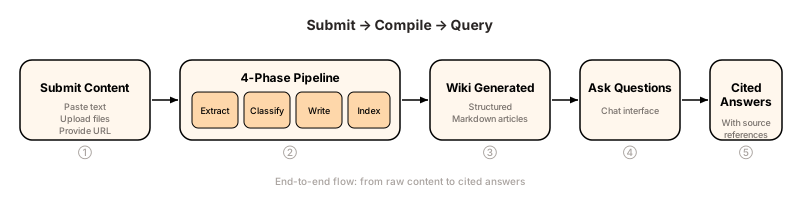
This tutorial walks you through the complete end-to-end flow: submitting content, watching it compile, and querying the resulting knowledge base.
Prerequisites
- KaaS is running at
http://localhost:8080(see Quickstart) - An LLM API key is configured (OpenAI, DeepSeek, Ollama, etc.)
Step 1: Submit Content
Open the Web UI at http://localhost:8080 and navigate to the Submit page.
KaaS accepts three types of input:
| Method | How | Best for |
|---|---|---|
| Paste text | Paste directly into the text area | Meeting notes, quick snippets |
| Upload files | Click "Upload" and select files | Documents, PDFs, transcripts |
| Provide URL | Enter a URL in the URL field | Web pages, online articles |
For this tutorial, paste the following sample text:
Our team decided to migrate from PostgreSQL to CockroachDB for the
payments service. The main reasons were: (1) horizontal scalability
without sharding complexity, (2) built-in distributed transactions,
and (3) PostgreSQL wire-protocol compatibility so existing queries
work unchanged. The migration is planned for Q3. We'll run both
databases in parallel for 2 weeks before cutting over.
Click Submit. You'll see a confirmation that your content has been queued for processing.
Step 2: Watch the Compile Pipeline
Navigate to the Status page to monitor progress. Each submission goes through a 4-phase pipeline:
- Extract — Identifies concepts, entities, decisions, and relationships from your raw content
- Classify — Determines which wiki articles this content should contribute to (new or existing)
- Write — Generates or merges structured Markdown articles
- Index — Updates the master index for retrieval
The Status page shows real-time progress for each phase. A typical short text completes in 10–30 seconds depending on your LLM provider's latency.
TIP
If a job stays in "Processing" for more than 2 minutes, check your LLM API key and network connectivity. See Troubleshooting for common issues.
Step 3: Browse the Wiki
Once compilation finishes, navigate to the Wiki page. You'll see the generated articles — in this case likely something like:
- Decisions — containing the migration decision, rationale, and timeline
- Projects — referencing the payments service migration
Each article is human-readable Markdown. You can click into any article to read the full content, which is structured with headings, bullet points, and cross-references.
Step 4: Ask Questions
Navigate to the Chat page. This is where you query your knowledge base using natural language.
Try asking:
Why are we migrating to CockroachDB?Step 5: Verify Cited Answers
KaaS responds with a streaming answer that includes source citations. You'll see something like:
The team decided to migrate from PostgreSQL to CockroachDB for the payments service for three main reasons: horizontal scalability without sharding complexity, built-in distributed transactions, and PostgreSQL wire-protocol compatibility.
— [Decisions.md]
The citation at the bottom tells you exactly which wiki article the answer draws from. This is a key difference from black-box RAG: you can click through to the source article, verify the content, and even edit it if needed.
What Happens Under the Hood
Unlike traditional RAG systems that chunk and embed raw text, KaaS compiles your content:
Raw Content → Extract → Classify → Write → Index → Structured WikiThe result is a set of human-readable Markdown articles — not opaque vector embeddings. When you ask a question, KaaS uses LLM-iterative retrieval over the master index to find relevant articles, then generates an answer grounded in the full article text.
Next Steps
- Submit more content to see how KaaS incrementally merges new information into existing articles
- Try different input methods (files, URLs) for varied source material
- Explore MCP Integration to query your knowledge base from a coding agent
- Read The Compile Pipeline for a deep dive into each phase