MCP Integration
Connect any Model Context Protocol (MCP) client to KaaS and query your compiled wiki directly from your coding agent.
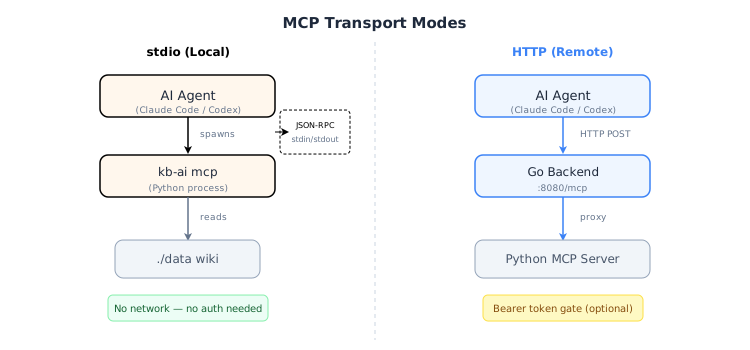
What is MCP
MCP (Model Context Protocol) is an open standard that lets AI agents call external tools over a structured JSON-RPC interface. KaaS implements an MCP server exposing a single ask tool — your agent sends a natural-language question and receives a cited Markdown answer grounded in the compiled wiki.
The ask Tool
ask(query, paths?, model?) → { answer, sources, cost_usd }| Parameter | Type | Description |
|---|---|---|
query | string | Natural-language question |
paths | string[] (optional) | Wiki article paths to ground the answer in (skips master-index navigation) |
model | string (optional) | Override the chat LLM model |
The tool runs LLM-iterative retrieval (master-index → page selection → full-article context), then generates an answer with inline [Title](path) citations.
stdio Transport (Local)
In stdio mode the agent spawns kb-ai mcp as a child process. Communication happens over stdin/stdout using JSON-RPC — no network, no authentication.
Prerequisites
kb-aiinstalled (viapip install kb-aior from source)- A compiled knowledge base directory (default:
./data) - LLM credentials in the environment
Environment Variables
export KAAS_KB_DIR="/path/to/your/wiki"   # Knowledge-base root
export LLM_API_KEY="sk-xxx"               # OpenAI-compatible API key
export LLM_BASE_URL="https://api.openai.com/v1"  # API endpoint
export LLM_MODEL="gpt-4o-mini"            # Model name
Claude Code Setup
claude mcp add kaas -- kb-ai mcpClaude Code will spawn kb-ai mcp and communicate via stdio automatically.
Codex / Other Agents
Add a stdio MCP server with:
- Command:
kb-ai mcp - Environment:
KAAS_KB_DIR,LLM_API_KEY,LLM_BASE_URL,LLM_MODEL
HTTP Transport (Remote)
In HTTP mode the Go backend exposes an MCP endpoint at /mcp. The agent connects over HTTP — suitable for shared servers and team deployments.
Docker Setup
docker run -d --name kaas \
  -p 8080:8080 \
  -v ./data:/app/data \
  -e LLM_API_KEY=sk-xxx \
  -e LLM_BASE_URL=https://api.openai.com/v1 \
  -e LLM_MODEL=gpt-4o-mini \
  -e KAAS_MCP_ENABLED=true \
  -e KAAS_MCP_TOKEN=your-secret-token \
  kaas
The MCP endpoint is available at http://<host>:8080/mcp.
Claude Code Setup
claude mcp add --transport http kaas http://host:8080/mcpIf authentication is enabled, configure the bearer token header as required by your agent.
Codex / Other Agents
Add a remote MCP server with:
- URL:
http://<host>:8080/mcp - Transport:
http(streamable-http) - Authorization:
Bearer your-secret-token(ifKAAS_MCP_TOKENis set)
Authentication
| Transport | Auth Mechanism | Configuration |
|---|---|---|
| stdio | None (no network surface) | — |
| HTTP | Bearer token (optional) | Set KAAS_MCP_TOKEN env var |
When KAAS_MCP_TOKEN is set, every HTTP request must include:
Authorization: Bearer your-secret-tokenWhen KAAS_MCP_TOKEN is empty or unset, the HTTP endpoint is open (intended for local/intranet use).
You can also configure authentication in etc/kaas.toml:
[ai.mcp]
enabled = true
token = "your-secret-token"   # empty = no auth
timeout_sec = 120
Choosing a Transport
| Aspect | stdio | HTTP |
|---|---|---|
| Deployment | Local (agent machine) | Remote server / Docker |
| Latency | Lowest (in-process) | Network round-trip |
| Authentication | None needed | Bearer token (optional) |
| Shared access | Single agent | Multiple agents / team |
| Setup complexity | Minimal | Docker + env vars |
| Data location | Local ./data directory | Server-side volume |
Use stdio when: you work alone, the wiki lives on your machine, and you want zero config.
Use HTTP when: the wiki is shared across a team, runs on a remote server, or you need access control.
Troubleshooting
kb-ai command not found
Ensure kb-ai is installed and on your PATH:
pip install kb-ai
# or from the KaaS repo:
cd py && pip install -e .
"No articles found" or empty answers
- Verify
KAAS_KB_DIRpoints to a compiled wiki (should containmaster-index.md) - Run a distillation first if the knowledge base is empty
Connection refused on HTTP transport
- Confirm
KAAS_MCP_ENABLED=trueis set - Check the container is running:
docker ps | grep kaas - Verify port mapping: the default is
8080
401 Unauthorized
- Set the correct bearer token in your agent configuration
- Check
KAAS_MCP_TOKENmatches what the agent sends in theAuthorizationheader
Timeout errors
- Default tool timeout is 120 seconds (configurable via
[ai.mcp] timeout_sec) - Large wikis may need a longer timeout for first-time retrieval
- Ensure the LLM endpoint (
LLM_BASE_URL) is reachable from the server