Retrieval
KaaS uses an LLM-iterative retrieval mechanism — no embeddings, no vector databases. The LLM itself navigates the compiled wiki to find relevant content, then generates a cited answer.
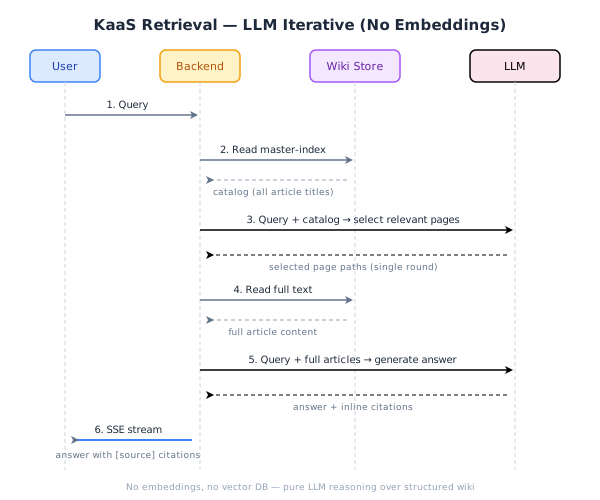
How It Works
The retrieval process has six steps, completed in a single pass:
1. User Query
The user sends a natural-language question via the Chat interface (or MCP ask tool).
2. Read Master-Index
The backend loads the master-index — a Markdown file listing every wiki article's title, path, and one-line summary. This is the catalog that the Index stage of the compile pipeline maintains automatically.
3. LLM Selects Relevant Pages
The query plus the entire master-index catalog is sent to the LLM in a single prompt. The LLM returns a list of page paths most likely to contain the answer. This is a single-round decision — no iterative loops or re-ranking.
4. Read Full Text
The backend reads the full Markdown content of each selected page from the wiki store.
5. Generate Answer with Citations
The full article text plus the original query is sent to the LLM. It generates an answer with inline citations — each claim references the source article by title and path (e.g., [Article Title](path)).
6. SSE Stream to User
The answer streams back to the user via Server-Sent Events (SSE). The frontend renders citation markers that link to the referenced wiki articles.
Why Not Vector Search?
Traditional RAG systems split documents into chunks, embed them into vectors, and retrieve by cosine similarity. KaaS takes a fundamentally different approach:
| Aspect | Traditional Vector RAG | KaaS LLM-Iterative |
|---|---|---|
| Preprocessing | Chunk + embed all content | Compile into structured wiki + maintain index |
| Index | Vector database (chromadb, pinecone, etc.) | Plain Markdown file (master-index.md) |
| Retrieval | Cosine similarity on embeddings | LLM reads catalog, selects pages by reasoning |
| Context quality | Raw chunks (often mid-paragraph) | Full, structured articles |
| Dependencies | Embedding model + vector DB | None beyond the LLM itself |
| Maintenance | Re-embed on every content change | Index auto-updates during compile |
Key Advantages
Zero infrastructure — No embedding model to host, no vector database to operate. The "index" is a Markdown file that any text editor can read.
Full-article context — Instead of retrieving fragmented 512-token chunks, the LLM reads complete, well-structured articles. This yields more coherent answers.
Compile-time quality — The heavy lifting happens during compilation (dedup, denoise, merge, structure). By retrieval time, the content is already clean and organized.
Transparent navigation — You can open
master-index.mdand see exactly what the LLM sees when selecting pages. No opaque similarity scores.
Trade-offs
- Catalog size limit — The master-index must fit in the LLM's context window. For most personal/team wikis (hundreds of articles), this is not a concern. For very large corpora (tens of thousands of articles), a hierarchical index (topic-index → master-index) or future vector-assisted pre-filtering may be needed.
- LLM cost per query — Each retrieval involves two LLM calls (page selection + answer generation). For high-traffic deployments, this is more expensive than a similarity lookup.
Optional Enhancements
KaaS supports two optional features that improve retrieval quality:
- Query Rewrite (
/rewrite) — Rewrites the user's question for better retrieval clarity before page selection. - Follow-up Suggestions (
/suggest) — After answering, suggests related questions the user might want to ask next.
Both are off by default and can be enabled per-request.
Implementation Reference
The retrieval logic lives in py/src/kb_ai/retrieve.py. The chat flow that orchestrates retrieval + answer generation is in py/src/kb_ai/server_chat.py.