Payout
Use this endpoint to transfer funds from a merchant account to a Bybit user. Payout supports two recipient methods:
- Payout to Account (default): identify the recipient using
payee.uid. - Payout to Card: encrypt the recipient's cardholder data and send it using
payee.encryptedCard; omitpayee.uid.
Choose exactly one recipient method for each request. Do not send both payee.uid and payee.encryptedCard.
- Data Type: JSON (
Content-Type: application/json) - Request Method: POST
- Path:
/v5/bybitpay/payout
Request Body
| Field Name | Type | Required | Description |
|---|---|---|---|
merchantId | string | Yes | Onboarding merchant UID |
merchantName | string | No | If not filled in, we will show users the name of your company doing KYB on the Bybit platform |
clientId | string | No | Merchant Client ID |
paymentType | string | Yes | Payment Type |
merchantTradeNo | string | Yes | Merchant Order Number |
amount | string | Yes | Order Amount |
currency | string | Yes | Order Currency (uppercase, e.g., EUR, USD, USDT) |
currencyType | string | Yes | Currency Type (fiat or crypto) |
combined | boolean | No | Whether combined payment is supported (true or false), default false。eg:When merchant's USDT assets are insufficient for the order amount, can BTC or other crypto currency assets be exchanged for USDT |
webhookUrl | string | No | API URL to call when order is successful or failed (max 256 characters) |
payee | Payee | Yes | Payee information. Pass uid for Payout to Account or encryptedCard for Payout to Card. See Payout to Account and Payout to Card for details. |
env | Env | Yes | Transaction Source |
riskInfo | RiskInfo | No | Risk info for order pay |
mccCode | string | Yes | Merchant category codes, ISO 18245:2023 |
Response
The response structure is the same for both recipient methods.
| Field Name | Type | Required | Description |
|---|---|---|---|
retCode | number | Yes | Return Code, 100000: success, not 0: failed, See Error Code |
retMsg | string | Yes | Return Message |
result | object | Yes | Return Result information |
result.order | PayOrder | Yes | Bybit PayOrder Detail |
Response Demo
{
  "retCode": 100000,
  "retMsg": "success",
  "result": {
    "order": {
      "merchantId": "1546593",
      "clientId": "",
      "paymentType": "MERCHANT_PAYOUT",
      "merchantTradeNo": "123456",
      "payId": "01JXMVAX2K7YNP1081ST1KSCCC",
      "status": "INIT",
      "amount": "0.00001",
      "currency": "USDT",
      "currencyType": "crypto",
      "receiveAmount": "0.00001",
      "receiveCurrency": "USDT",
      "receiveCurrencyType": "crypto",
      "createTime": 1749825188,
      "paymentTime": 0,
      "finishTime": 0,
      "refundOrders": []
    }
  }
}
Payout to Account
Payout to Account is the default payout method. Send the recipient's Bybit UID in payee.uid.
Payee Fields
| Field Name | Type | Required | Description |
|---|---|---|---|
payee.uid | string | Yes | Recipient's Bybit UID. |
payee.encryptedCard | string | No — must be omitted | Do not send encrypted cardholder data for Payout to Account. |
Request Demo
{
  "currency": "USDT",
  "currencyType": "crypto",
  "paymentType": "MERCHANT_PAYOUT",
  "merchantId": "1546593",
  "merchantName": "merchantName",
  "merchantTradeNo": "123456",
  "amount": "0.00001",
  "combined": true,
  "payee": {
    "uid": "104326306"
  },
  "webhookUrl": "https://www.merchant.com/webhook/payout",
  "env": {
    "browserVersion": "Mozilla/5.0",
    "device": "400017492767368721919",
    "ip": "203.0.113.10",
    "terminalType": "WEB"
  },
  "mccCode": "5816"
}
Payout to Card
Payout to Card uses the same endpoint, common request fields, response, order status, webhook notification, and idempotency rules as Payout to Account. The only request difference is the payee object:
- Encrypt the required cardholder data and send the result in
payee.encryptedCard. - Do not send
payee.uid.
Payee Fields
| Field Name | Type | Required | Description |
|---|---|---|---|
payee.encryptedCard | string | Yes | Cardholder data encrypted using the AES-256-GCM procedure described below. |
payee.uid | string | No — must be omitted | Do not send the UID for Payout to Card. |
Encrypting Cardholder Data
Create an encryption key:
- Sign in to the Bybit Pay Merchant Portal.
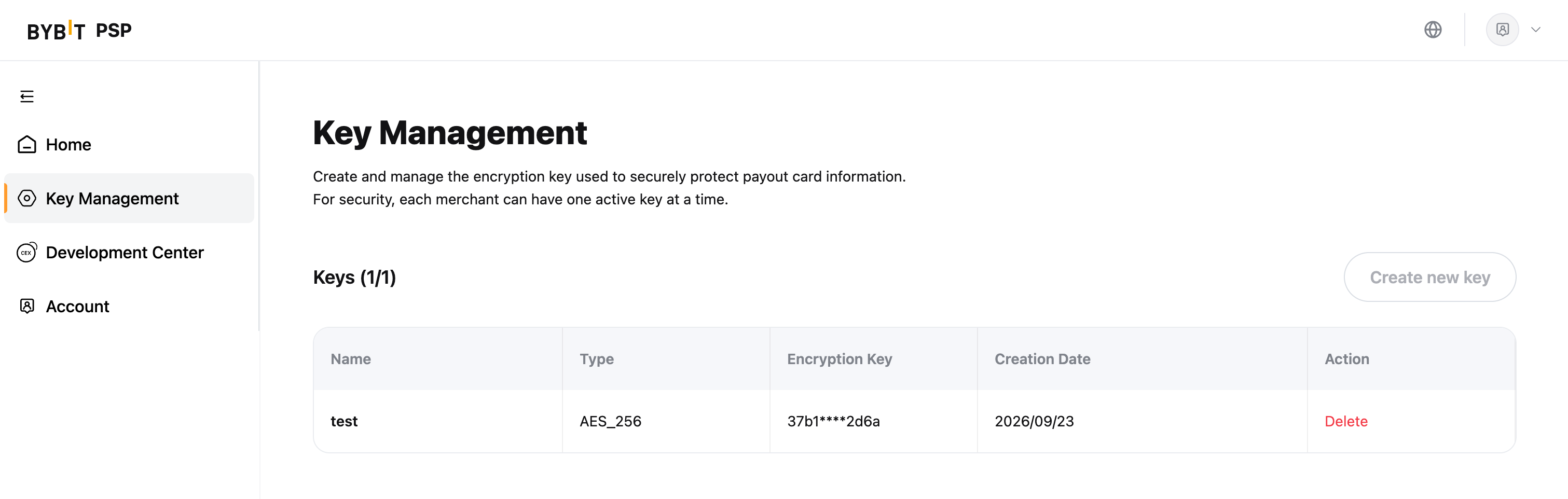
- Open Key Management.
- Create an AES-256 encryption key.
- Securely store the plaintext key when it is displayed. The plaintext key is shown only once and cannot be queried again.
Key Management page screenshot:
Use this AES-256 key to encrypt the cardholder data according to the procedure below.
Plaintext payload:
Before encryption, serialize the following object as compact UTF-8 JSON. Field names are case-sensitive and all four fields are required.
| Field Name | Type | Required | Description |
|---|---|---|---|
cardNumber | string | Yes | Full card number. |
firstName | string | Yes | Cardholder's first name. |
lastName | string | Yes | Cardholder's last name. |
dob | string | Yes | Cardholder's date of birth in yyyy-MM-dd format. |
{
  "cardNumber": "<FULL_CARD_NUMBER>",
  "firstName": "<FIRST_NAME>",
  "lastName": "<LAST_NAME>",
  "dob": "2000-09-26"
}
Do not include CVV/CVC, PIN, expiry date, or any additional card fields in this payload.
AES-256-GCM requirements:
- Read the 64-character plaintext key as a hexadecimal string and hex-decode it into exactly 32 bytes. Do not use the UTF-8 bytes of the hexadecimal string as the AES key.
- Generate a new cryptographically secure random 12-byte IV for each encryption operation. Never reuse an IV with the same key.
- Encrypt the compact UTF-8 JSON using
AES/GCM/NoPadding, a 128-bit authentication tag, and no additional authenticated data (AAD). - Concatenate the binary output in this exact order:
12-byte IV || ciphertext || 16-byte authentication tag. - Encode the complete byte array using RFC 4648 Standard Base64. Send the resulting string as
payee.encryptedCard.
key           = HEX_DECODE(merchantPlainKey)        // 32 bytes
iv            = SECURE_RANDOM_BYTES(12)             // unique per request
cipherAndTag  = AES_256_GCM_ENCRYPT(key, iv, utf8Json, tagBits=128, aad=none)
encryptedCard = BASE64_STANDARD(iv || cipherAndTag)
Java encryption example:
The following standalone JDK example uses a main method and can be run after replacing the placeholders. In production, use your standard JSON serialization library instead of manually concatenating JSON strings.
import javax.crypto.Cipher;
import javax.crypto.spec.GCMParameterSpec;
import javax.crypto.spec.SecretKeySpec;
import java.nio.charset.StandardCharsets;
import java.security.GeneralSecurityException;
import java.security.SecureRandom;
import java.util.Base64;

public class PayoutToCardEncrypt {

    private static final SecureRandom SECURE_RANDOM = new SecureRandom();

    /**
     * Encrypts a UTF-8 payload with AES-256-GCM.
     *
     * Output before Base64 encoding:
     * [12-byte IV][ciphertext][16-byte authentication tag]
     */
    public static String aesGcmEncryptBase64(String plainText, byte[] key)
            throws GeneralSecurityException {
        if (key == null || key.length != 32) {
            throw new IllegalArgumentException("AES-256 key must be exactly 32 bytes");
        }

        byte[] iv = new byte[12];
        SECURE_RANDOM.nextBytes(iv);

        SecretKeySpec secretKeySpec = new SecretKeySpec(key, "AES");
        GCMParameterSpec gcmParameterSpec = new GCMParameterSpec(128, iv);
        Cipher cipher = Cipher.getInstance("AES/GCM/NoPadding");
        cipher.init(Cipher.ENCRYPT_MODE, secretKeySpec, gcmParameterSpec);

        byte[] plainBytes = plainText.getBytes(StandardCharsets.UTF_8);
        byte[] cipherWithTag = cipher.doFinal(plainBytes);

        byte[] result = new byte[iv.length + cipherWithTag.length];
        System.arraycopy(iv, 0, result, 0, iv.length);
        System.arraycopy(cipherWithTag, 0, result, iv.length, cipherWithTag.length);

        return Base64.getEncoder().encodeToString(result);
    }

    /**
     * Decodes the 64-character hexadecimal AES-256 key into 32 bytes.
     */
    public static byte[] hexToBytes(String hex) {
        if (hex == null || !hex.matches("[0-9a-fA-F]{64}")) {
            throw new IllegalArgumentException(
                    "AES-256 key must be a 64-character hexadecimal string");
        }

        byte[] data = new byte[hex.length() / 2];
        for (int i = 0; i < hex.length(); i += 2) {
            int high = Character.digit(hex.charAt(i), 16);
            int low = Character.digit(hex.charAt(i + 1), 16);
            data[i / 2] = (byte) ((high << 4) + low);
        }
        return data;
    }

    public static void main(String[] args) throws GeneralSecurityException {
        // Replace with the 64-character hexadecimal AES-256 key.
        // Do not use plainKeyHex.getBytes(); hex-decode it into 32 bytes.
        String plainKeyHex = "<64_HEX_CHAR_AES_256_KEY>";
        byte[] aesKey = hexToBytes(plainKeyHex);

        // Use real values only at runtime. Do not log or persist this plaintext.
        String payload = "{"
                + "\"cardNumber\":\"<FULL_CARD_NUMBER>\","
                + "\"firstName\":\"<FIRST_NAME>\","
                + "\"lastName\":\"<LAST_NAME>\","
                + "\"dob\":\"2000-09-26\""
                + "}";

        String encryptedCard = aesGcmEncryptBase64(payload, aesKey);

        // Local integration verification only. Do not log encrypted card data in production.
        System.out.println(encryptedCard);
    }
}
Never log or persist the plaintext key, card number, cardholder data, plaintext JSON, or decrypted data. Encrypt the payload immediately and handle cardholder data according to applicable PCI DSS requirements.
Request Demo
{
  "currency": "USDT",
  "currencyType": "crypto",
  "paymentType": "MERCHANT_PAYOUT",
  "merchantId": "1546593",
  "merchantName": "merchantName",
  "merchantTradeNo": "123456",
  "amount": "0.00001",
  "combined": true,
  "payee": {
    "encryptedCard": "aGCQwo0zaaXAXzgc4KRMsZWGCWWM+OzzaTcn8LixMXnzfxWla3dxppZUtiCSq7d0D1C6t7Dh5ka8rVU/E+zXskPmhRiqIVUnLFsXYEd5mTXf8INhzezVf2tiJrwA5oFKrfzF364TTOumc4CXGxiLM+J8dePQED1J"
  },
  "webhookUrl": "https://www.merchant.com/webhook/payout",
  "env": {
    "browserVersion": "Mozilla/5.0",
    "device": "400017492767368721919",
    "ip": "203.0.113.10",
    "terminalType": "WEB"
  },
  "mccCode": "5816"
}
Generate encryptedCard first, place it in the final JSON request body, and then calculate the V5 API signature using that final request body.