Payment Notify
Authentication
- Share the IP whitelist with each other;
- Bybit Pay signs Webhook callbacks using SHA256withRSA (RSA PKCS#1 v1.5 with SHA-256). The merchant verifies the signature using the corresponding public key. For details, please see Signature Algorithm.
Merchant-specific Webhook RSA Key
A merchant-specific Webhook RSA key is optional. The Key Management page provides two independent key types:
| Key Type | Purpose | How It Is Used |
|---|---|---|
RSA_1024_WEBHOOK | Sign and verify Webhook callbacks | Bybit Pay signs the callback with the private key, and the merchant verifies it with the public key copied from the Merchant Portal. |
AES_256 | Encrypt Payout to Card data | The merchant encrypts card data before sending it to Bybit Pay. It is not used for Webhook signing. |
- If
RSA_1024_WEBHOOKhas not been created, callbacks are signed with the Bybit Pay platform key. - Once
RSA_1024_WEBHOOKis created, it takes effect immediately and subsequent callbacks are signed with the merchant-specific key. - After
RSA_1024_WEBHOOKis deleted, subsequent callbacks immediately return to the Bybit Pay platform key.
RSA_1024_WEBHOOK uses exactly the same SHA256withRSA (RSA PKCS#1 v1.5 with SHA-256) algorithm as the Bybit Pay platform key. Only the RSA key pair becomes merchant-specific. The signed content, HTTP headers, Base64 encoding, RSA key size, and single-line public key format remain unchanged. API request signing is not affected.
Create the Key
- Sign in to the Bybit Pay Merchant Portal.
- Open Key Management.
- Click Create new key.
- Select
RSA_1024_WEBHOOK, enter a key name, and confirm the creation. - Copy the displayed public key and add it to your webhook verifier.
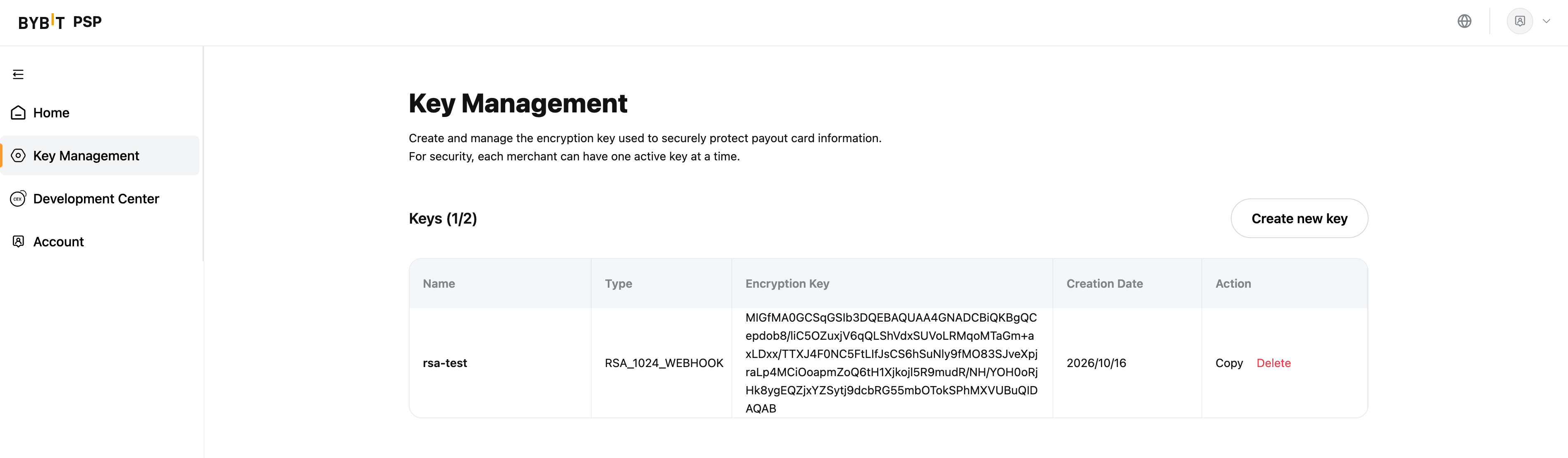
Create RSA_1024_WEBHOOK only if you need a merchant-specific key and your production verifier is ready. There is no delayed activation.
Creating or deleting this key immediately changes the key used to sign new Webhook callbacks. If your verifier does not accept the correct public key, signature verification will fail and Webhook processing may be interrupted.
- Create: Creating
RSA_1024_WEBHOOKimmediately replaces the Bybit Pay platform key for all subsequent callbacks. - Delete: Deleting
RSA_1024_WEBHOOKimmediately switches subsequent callbacks back to the platform key. - Replace: Deleting the old key switches signing to the platform key. Creating the new key then switches signing immediately to the new merchant-specific key.
If the verifier does not accept the currently active key, Webhook signature verification will fail and dependent business processing may be interrupted.
HTTP Request
Method: POST
URL: provide the callback url in the Create Payment request parameter webhookUrl
Header
| Parameter | Comments |
|---|---|
| Content-Type | application/json |
| timestamp | Current timestamp (Unix seconds, 10 digits) |
| publicKey | Merchant's RSA public key (optional, used for webhook signature verification) |
| signature | Generated by Signature Algorithm |
All timestamp fields in webhook callbacks use Unix timestamp in seconds (10 digits):
- Header
timestamp:1736236800(seconds since epoch) - Body fields (
createTime,paymentTime,finishTime):1736233200(seconds since epoch)
Important: When verifying the signature, use the timestamp values exactly as they appear in the JSON body. Do NOT multiply by 1000.
Callback Request Parameters
| Parameter | Type | Comments |
|---|---|---|
| paymentType | string | Payment type E_COMMERCE: Bybit QR Pay for e-commerceE_COMMERCE_REFUND: Bybit QR Pay refund for e-commerceONCHAIN_PAY: Bybit On-chain payONCHAIN_PAY_REFUND: Bybit On-chain pay refund |
| <PayOrderType> | Returned when "paymentType"=E_COMMERCE | |
| <RefundOrderType> | Returned when "paymentType"=E_COMMERCE_REFUND |
Signature Algorithm
The signature algorithm is the same for both the Bybit Pay platform key and RSA_1024_WEBHOOK: SHA256withRSA (RSA PKCS#1 v1.5 with SHA-256), using a 1024-bit RSA key.
When a merchant-specific RSA_1024_WEBHOOK key exists, Bybit Pay signs subsequent Webhook callbacks with that private key. Otherwise, Bybit Pay continues to use the platform private key. The merchant must verify each callback with the corresponding public key. The signature input remains timestamp + raw JSON request body, and the signature remains Base64-encoded.
Bybit Pay webhook uses JSON body for signature calculation. The signature string is constructed by concatenating:
timestamp + JSON_body
Where:
timestamp: Current Unix timestamp in seconds (10 digits)JSON_body: Complete JSON request body as a string (no sorting, no conversion)
Important: Do NOT convert the JSON to URL-encoded format. Use the raw JSON string directly.
Sign (Bybit Pay)
- Generate current timestamp (Unix seconds):
timestamp = 1736236800 - Marshal the callback data to JSON string (preserve field order as-is)
- Concatenate:
signContent = timestamp + jsonString1736236800{"paymentType":"E_COMMERCE","merchantId":"305142568",...} - Encrypt with SHA256 and sign with RSA (PKCS1v15, 1024-bit key)
- Encode the signature bytes in base64
Verify (Merchant Side)
- Get
timestampandsignaturefrom request headers - Read the raw request body as string (do not parse yet)
- Concatenate:
signContent = timestamp + requestBody1736236800{"paymentType":"E_COMMERCE","merchantId":"305142568",...} - Decode the signature from base64
- Verify the signature using SHA256 and the corresponding RSA public key
Example: Sign & Verify
For example, we sign the following data. The timestamp is 1736236800, the RSA key is
-----The following key pairs are for testing only-----
-----BEGIN RSA PUBLIC KEY-----
MIGJAoGBAOFSnhqtu40TOtok+yXeB+O76PXb/VAJU4Yih6hViOdSGd7imWmCSZyP
psl3TmXXXXXXXXXXXXXXXXXXXXXXXXXXXXXXXXXXXXXXXXXXXf+AxlKYMj8OQ
AgDPmZG1a5ydFrje4PLytC7sUw3GP4TTk8xg6iMHmYPdRDv7AEWdAgMBAAE=
-----END RSA PUBLIC KEY-----

-----BEGIN RSA PRIVATE KEY-----
MIICXwIBAAKBgQDhUp4arbuNEzraJPsl3gfju+j12/1QCVOGIoeoVYjnUhne4plp
gkmcj6bJd05i4VKAfq082AXXXXXXXXXXXXXXXXXXXXXXXXXXXXXXXXXXXXXXXXXX
DI/DkAIAz5mRtWucnRa43XXXXXXXXXXXXXXXXXXXXXXXXXXXXXXXXXXXXXXXXXXX
AoGBAIqpeCi83516xw32XXXXXXXXXXXXXXXXXXXXXXXXXXXXXXXXXXXXXXXXXXXX
axzIwyfWTTATWbiCS9sqXXXXXXXXXXXXXXXXXXXXXXXXXXXXXXXXXXXXXXXXXXXX
6gOQYu8kzRqCzqvyMNdAHXXXXXXXXXXXXXXXXXXXXXXXXXXXXXXXXXXXXXXXXXXX
e/Gxi7qhuIKz0mvfA/yieXXXXXXXXXXXXXXXXXXXXXXXXXXXXXXXXXXXXXXXXXXX
3IBIdV/CbwJBAOQcsOPf+XXXXXXXXXXXXXXXXXXXXXXXXXXXXXXXXXXXXXXXXXXX
/5V9zdim+hPq+9cvsqO7dXXXXXXXXXXXXXXXXXXXXXXXXXXXXXXXXXXXXXXXXXXX
MY4uV8noiqDRf/pvAkyMMXXXXXXXXXXXXXXXXXXXXXXXXXXXXXXXXXXXXXXXXXXX
15eWR4jEoXMIFkd7Onc6tXXXXXXXXXXXXXXXXXXXXXXXXXXXXXXXXXXXXXXXXXXX
Bnj6KW1fk+UM29dUDjmTqXXXXXXXXXXXXXXXXXXXXXXXXXXXXXXXXXXXXXXXXXXX
IavMyjrhDKyBGZ0mI6eoREaC4bxl31RRkYtg9mNeU3TxsBM=
-----END RSA PRIVATE KEY-----
JSON Payload Example:
{
    "paymentType": "E_COMMERCE",
    "merchantId": "305142568",
    "clientId": "client_001",
    "merchantTradeNo": "af8c2d1-5b3e-4a9f-b6c7-8d2e1f3a4b5c",
    "payId": "01JY2KM5QNPXR8S4HTJZT9BC12",
    "status": "PAY_SUCCESS",
    "amount": "100",
    "currency": "USDT",
    "currencyType": "crypto",
    "createTime": 1736233200,
    "paymentTime": 1736233260,
    "finishTime": 1736233260
}
Signature Calculation Steps:
- Generate timestamp:
1736236800 - Convert JSON to string (minified, no extra spaces):
{"paymentType":"E_COMMERCE","merchantId":"305142568","clientId":"client_001","merchantTradeNo":"af8c2d1-5b3e-4a9f-b6c7-8d2e1f3a4b5c","payId":"01JY2KM5QNPXR8S4HTJZT9BC12","status":"PAY_SUCCESS","amount":"100","currency":"USDT","currencyType":"crypto","createTime":1736233200,"paymentTime":1736233260,"finishTime":1736233260} - Concatenate:
signContent = timestamp + jsonString1736236800{"paymentType":"E_COMMERCE","merchantId":"305142568",...} - Sign with SHA256 + RSA private key
- Encode to base64:
NgDZLZCVBdma904hzZXmU+fQ7dr7z7muZkuwAbDnibLXXXXXXXXXXXXgmzad58LfRtLXGlkNPXXXXXXXXXXX9jNYd6gxp7j0Mlh0vQlQCIb2283DQ3wbZDphilvXXXXXXXXXXXXX2IIBelYBBw39U=
Verification Steps (Merchant Side):
- Extract
timestampandsignaturefrom request headers - Read raw request body (string, do not parse)
- Concatenate:
signContent = timestamp + requestBody - Decode signature from base64
- Verify using SHA256 + RSA public key
Test Keys:
-----The following key pairs are for testing only-----
-----BEGIN RSA PUBLIC KEY-----
MIGJAoGBAOFSnhqtu40TOtok+yXeB+O76PXb/VAJU4Yih6hViOdSGd7imWmCSZyP
psl3TmXXXXXXXXXXXXXXXXXXXXXXXXXXXXXXXXXXXXXXXXXXXf+AxlKYMj8OQ
AgDPmZG1a5ydFrje4PLytC7sUw3GP4TTk8xg6iMHmYPdRDv7AEWdAgMBAAE=
-----END RSA PUBLIC KEY-----

-----BEGIN RSA PRIVATE KEY-----
MIICXwIBAAKBgQDhUp4arbuNEzraJPsl3gfju+j12/1QCVOGIoeoVYjnUhne4plp
gkmcj6bJd05i4VKAfq082AXXXXXXXXXXXXXXXXXXXXXXXXXXXXXXXXXXXXXXXXXX
DI/DkAIAz5mRtWucnRa43XXXXXXXXXXXXXXXXXXXXXXXXXXXXXXXXXXXXXXXXXXX
AoGBAIqpeCi83516xw32XXXXXXXXXXXXXXXXXXXXXXXXXXXXXXXXXXXXXXXXXXXX
axzIwyfWTTATWbiCS9sqXXXXXXXXXXXXXXXXXXXXXXXXXXXXXXXXXXXXXXXXXXXX
6gOQYu8kzRqCzqvyMNdAHXXXXXXXXXXXXXXXXXXXXXXXXXXXXXXXXXXXXXXXXXXX
e/Gxi7qhuIKz0mvfA/yieXXXXXXXXXXXXXXXXXXXXXXXXXXXXXXXXXXXXXXXXXXX
3IBIdV/CbwJBAOQcsOPf+XXXXXXXXXXXXXXXXXXXXXXXXXXXXXXXXXXXXXXXXXXX
/5V9zdim+hPq+9cvsqO7dXXXXXXXXXXXXXXXXXXXXXXXXXXXXXXXXXXXXXXXXXXX
MY4uV8noiqDRf/pvAkyMMXXXXXXXXXXXXXXXXXXXXXXXXXXXXXXXXXXXXXXXXXXX
15eWR4jEoXMIFkd7Onc6tXXXXXXXXXXXXXXXXXXXXXXXXXXXXXXXXXXXXXXXXXXX
Bnj6KW1fk+UM29dUDjmTqXXXXXXXXXXXXXXXXXXXXXXXXXXXXXXXXXXXXXXXXXXX
IavMyjrhDKyBGZ0mI6eoREaC4bxl31RRkYtg9mNeU3TxsBM=
-----END RSA PRIVATE KEY-----
Request Example
Callback Pay Order (Payment Success)
POST ${webhook url} HTTP/1.1
Host: www.merchant.com
timestamp: 1736233260
signature: NgDZLZCVBdma904hzZXmU+fQ7dr7z7muZkuwAbDnibLXXXXXXXXXXXXgmzad58Lf...
Content-Type: application/json

{
    "paymentType": "E_COMMERCE",
    "merchantId": "305142568",
    "clientId": "client_001",
    "merchantTradeNo": "af8c2d1-5b3e-4a9f-b6c7-8d2e1f3a4b5c",
    "payId": "01JY2KM5QNPXR8S4HTJZT9BC12",
    "status": "PAY_SUCCESS",
    "amount": "100",
    "currency": "USDT",
    "currencyType": "crypto",
    "createTime": 1736233200,
    "paymentTime": 1736233260,
    "finishTime": 1736233260,
    "customer": {
        "uid": "104326789",
        "externalUserId": "user123@merchant.com",
        "userName": "John Doe",
        "registerTime": 1704067200,
        "kycCountry": "USA"
    }
}
Callback Pay Order (Payment Failed)
POST ${webhook url} HTTP/1.1
Host: www.merchant.com
timestamp: 1736233500
signature: NgDZLZCVBdma904hzZXmU+fQ7dr7z7muZkuwAbDnibLXXXXXXXXXXXXgmzad58Lf...
Content-Type: application/json

{
    "paymentType": "E_COMMERCE",
    "merchantId": "305142568",
    "clientId": "client_001",
    "merchantTradeNo": "bf9d3e2-6c4f-5b0g-c8d9-9e3f2g4b6d7e",
    "payId": "01JY2KM5QNPXR8S4HTJZT9BC13",
    "status": "PAY_FAILED",
    "amount": "50",
    "currency": "USDT",
    "currencyType": "crypto",
    "createTime": 1736233300,
    "paymentTime": 0,
    "finishTime": 1736233500,
    "customer": {
        "uid": "104326790",
        "externalUserId": "user456@merchant.com",
        "userName": "Jane Smith",
        "registerTime": 1709251200,
        "kycCountry": "GBR"
    }
}
Callback Refund Order
POST ${webhook url} HTTP/1.1
Host: www.merchant.com
timestamp: 1736234000
signature: NgDZLZCVBdma904hzZXmU+fQ7dr7z7muZkuwAbDnibLXXXXXXXXXXXXgmzad58Lf...
Content-Type: application/json

{
    "paymentType": "E_COMMERCE_REFUND",
    "refundId": "RF01JY2KM5QNPXR8S4HTJZT9BC14",
    "refundType": "MERCHNT_SELF_REFUND",
    "merchantTradeNo": "af8c2d1-5b3e-4a9f-b6c7-8d2e1f3a4b5c",
    "merchantRefundNo": "RF-2026-0001",
    "payId": "01JY2KM5QNPXR8S4HTJZT9BC12",
    "refundStatus": "REFUND_SUCCESS",
    "refundCurrency": "USDT",
    "amount": "50",
    "createTime": 1736234000
}
Callback Broker Prefund Order
This webhook is triggered for broker prefund orders (payment type: BROKER_PREFUND). It notifies merchants about cryptocurrency exchange/conversion order status updates.
Use Case: When a merchant processes a fiat-to-crypto or crypto-to-fiat conversion through Bybit's broker service.
POST ${webhook url} HTTP/1.1
Host: www.merchant.com
timestamp: 1736235000
signature: NgDZLZCVBdma904hzZXmU+fQ7dr7z7muZkuwAbDnibLXXXXXXXXXXXXgmzad58Lf...
Content-Type: application/json

{
    "tradeNo": "DL202601280001",
    "status": "completed",
    "quoteTxId": "QUOTE-20260128-001",
    "exchangeRate": "1.0025",
    "fromCoin": "USD",
    "fromCoinType": "fiat",
    "toCoin": "USDT",
    "toCoinType": "crypto",
    "fromAmount": "1000.00",
    "toAmount": "998.75",
    "createdAt": "1736235000000",
    "subUserid": "12345678"
}
Broker Prefund Order Fields:
| Field | Type | Description |
|---|---|---|
| tradeNo | string | Broker deal order ID |
| status | string | Order status: pending, completed, failed, cancelled |
| quoteTxId | string | Quote transaction ID (price lock ID) |
| exchangeRate | string | Exchange rate applied (unit price) |
| fromCoin | string | Source currency/coin |
| fromCoinType | string | Source currency type: fiat or crypto |
| toCoin | string | Destination currency/coin |
| toCoinType | string | Destination currency type: fiat or crypto |
| fromAmount | string | Source amount (how much user pays) |
| toAmount | string | Destination amount (how much user receives) |
| createdAt | string | Order creation timestamp in milliseconds (13 digits) |
| subUserid | string | Sub-user ID (slave UID) |
Status Values:
pending: Order is being processedcompleted: Order completed successfullyfailed: Order failedcancelled: Order was cancelled
Note: Unlike payment orders, the createdAt field in broker prefund orders uses milliseconds (13 digits), not seconds.
Auth
Auth reuses the existing Payment Notify webhook. The webhook URL, method, authentication, signature, headers, response, and retry rules remain unchanged.
The existing PayOrder webhook body adds the following fields:
| Field Name | Type | Required | Description |
|---|---|---|---|
authStatus | string | Yes | Current authorization status: SUCCESS, REJECTED, OVERTIME, or EXPIRED. |
authExpireAt | string | No | Authorization expiry time as a UTC Unix timestamp in milliseconds. Returned for SUCCESS. |
customer | Customer Type | No | Authorized customer fields. Returned only for SUCCESS while the authorization remains valid. |
The webhook is triggered after authorization reaches SUCCESS, REJECTED, or OVERTIME. PENDING does not trigger a merchant webhook. Authorization expiry itself does not trigger an additional webhook; query /v5/bybitpay/pay_result for the current status. If delivery or retry of an existing success notification occurs after the authorization has expired, the notification reflects the current EXPIRED status and does not include customer.
Notify PayOrder demo
{
  "merchantId": "305142568",
  "clientId": "",
  "paymentType": "E_COMMERCE",
  "merchantTradeNo": "auth-20261005-000001",
  "payId": "01M45AUTHEXAMPLE00000000001",
  "status": "PAY_SUCCESS",
  "amount": "0",
  "currency": "USDT",
  "currencyType": "crypto",
  "createTime": 1791178200,
  "paymentTime": 1791178300,
  "finishTime": 0,
  "authStatus": "SUCCESS",
  "authExpireAt": "1791264700000",
  "customer": {
    "uid": "100000001",
    "legalIdNumber": "P1234567",
    "idType": "PASSPORT",
    "firstName": "John",
    "lastName": "Doe",
    "dateOfBirth": "1990-01-01",
    "kyc1Country": "SGP",
    "email": "john.doe@example.com",
    "phone": "+65 81234567"
  }
}